Order Now!
| Tutorials View video tutorials here (more will be added soon) |
New Features
The list of new features is quite extensive. Below is just a
sampling of some of those features.
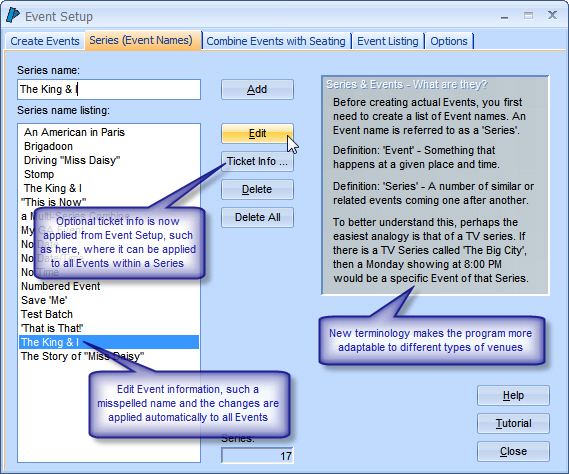
Terminology change
So that the program makes sense in a broader market - Performance will now be Event ... Production will now be Series.
General
Improved: Editing of Events, Pricing and Seating can now be done at any time, even after orders have been taken.
New: Cloning (discussed below), makes slightly altered changes intended only for future use, very easy.
New: The program now supports visual styles (skins). The visual (cosmetic) appearance of the windows can be modified to reflect various styles of Windows, Office, or the wide variety of custom skins available.
Events
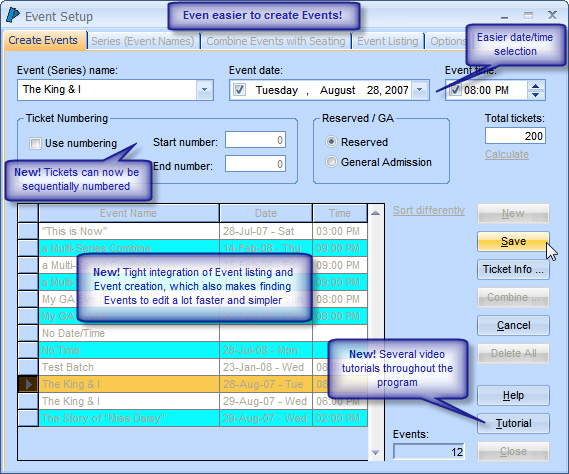
New: Unlimited Series names can be created and stored in advance - making Event creation faster and simpler.
New: Automated function to create multiple Events in seconds.
Improved: Date and time selection has been made easier.
Improved: Events are now listed on the Event Setup window so that they can be quickly referenced and a specific Event quickly located for editing.
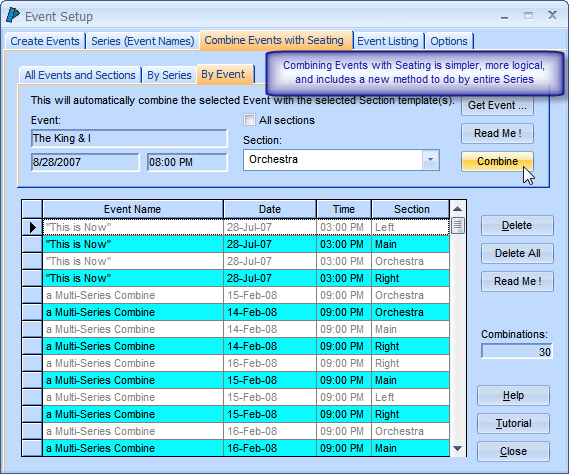
Improved: Event Seating combinations are also listed on the Event Setup window.
New: Manual Event/Seating combining functions now include capability to combine by entire Series as well as by specific Event.
Improved: Ticket info can be applied directly from the Event Setup window, and ticket text can be assigned to an entire series, instead of going through Event by Event.
Event Creation
New: Changes made to a section template are automatically carried through to all combined sections.
New: Section templates can now be cloned, should a slightly altered seating arrangement be required for different Events.
Improved: Setting up section templates is now easier.
New: Click & drag the mouse to select multiple seats at once.
New: One-Click to automatically select all sequential seats for an order.
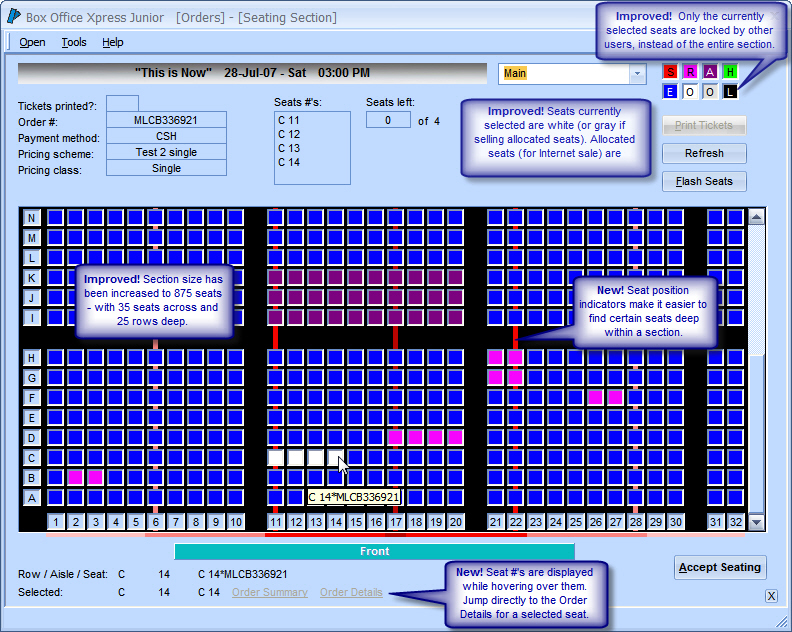
New: Open the Order Details screen with the order that applies to a selected seat.
Improved: Can now sell tickets, for a single order, across multiple seating sections.
Improved: Increased size of seating sections to 875 seats (25 rows deep by 35 seats across).
Improved: Center guidelines for easier designing of seating and easier selling of best seats.
Improved: Selecting seats turns them white for easier identification.
Improved: When one user is selecting seats, those specific seats appear locked (black) to other users, instead of the entire section.
Improved: Can now batch print all unsold tickets for a specific section, or for all sections of an Event - with a single click.
Improved: The seat, row and aisle info is displayed instantly as the mouse hovers over each seat.
New: Seats can be blocked for allocated Internet ticketing, and a report created to send to the external service of your choice (such as AdmiTix). These seats can be sold as allocated orders come in.
New: Customers can have preferred seats. The program can automatically select these seats for each individual order.
New: You can now set a specific seating section as the Priority section. This section will open first when selecting seats for an order or just when viewing sections.
Seat Selection
New: Tickets can optionally be sequentially numbered, for both general admission and reserved seating.
Improved: Ticket text can now be applied to an entire Series as a default for that Series, and then optionally altered by specific Event (i.e. make the first event "Opening Night").
Improved: Global default ticket layout configuration for all users. No need to set layout for each individual user, unless different layouts are desired.
Improved: Ticket layouts can now be set for all users by the administrator.
Improved: Receipt ticket style now selects reserved or general admission layouts automatically.
New: USB ticket printers are now supported for Practical Automation (PA & Boca parallel and serial printers are also supported as usual).
New: Optional ticket graphic (such as a logo) is included with the built-in ticket layouts, and can be resized.
New: Bar code
scanning for tickets*. The scanner advises you of forgery, invalid tickets,
wrong event, invalid order, and if ticket was already used. Optionally, the
customer name can be displayed by the scanner so that they may be greeted by
name.
* requires site license
New: You can now easily order ticket stock with Corporate Consultants directly through the program.
Pricing
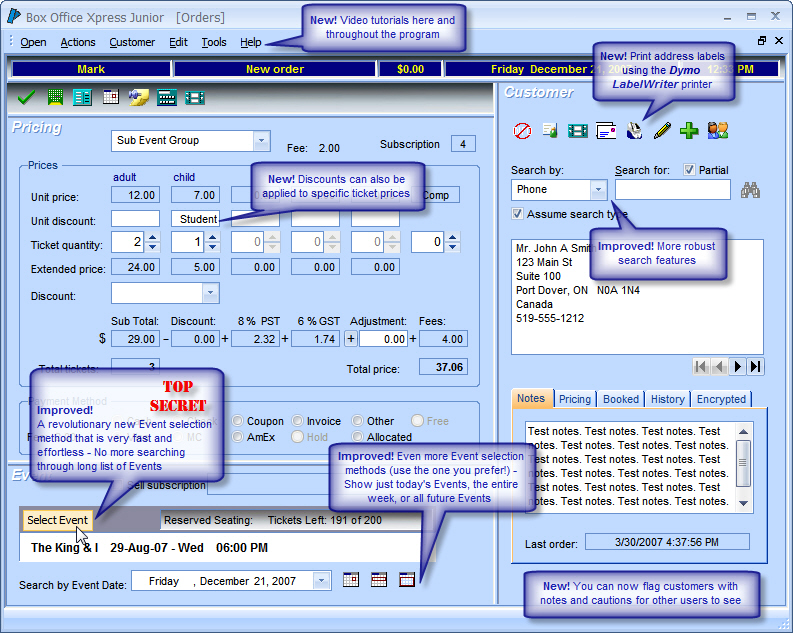
New: Per-ticket discounts - instead of just per order discounts. This way, only certain tickets within an order can be discountable.
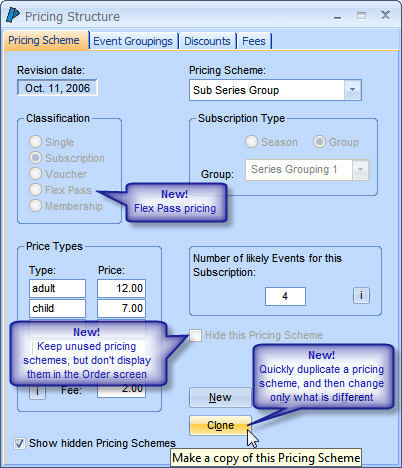
New: Pricing Schemes can be cloned so that similar pricing schemes can be created even faster.
New: Flex Pass has been added as a new Pricing Scheme classification.
New: Unused Pricing Schemes can be hidden from the Order process.
New: Event groupings can now be assigned to Single ticket pricing as well as Voucher and Flex Pass pricing, making Event selection even easier.
Improved: Event Groupings can be done by entire Series, as well as by specific Events and day/time range.
New: Service fees (per-ticket) can now be added to orders. This is for ticket outlets that wish to charge their clients and/or patrons a service fee. Different fees can be used for different Events.
Pricing Setup
Customer
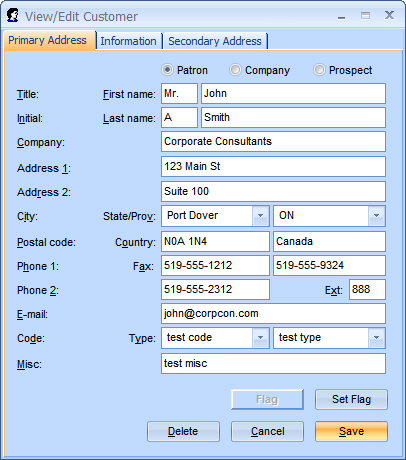
Improved: Expanded to include more information, including an alternate address and other new data.
Improved: More robust and easier search features.
New: E-mail address field added.
New: Flag customers.
New: Print address labels using any DYMO LabelWriter.
New: Add customer information directly from AdmiTix sales reports.
Add/Edit Customers
Orders
Improved: A revolutionary Event selection method that is very fast and effortless. No more searching through long lists.
New: Additional, easy Event selection methods that further improve the convenience of selecting Events.
Improved: Easier search features.
Improved: An easier multiple order tally method. Instantly create a tally of the last 'x' orders. No need to preset in advance.
New: Allocated Internet ticketing has been added as a payment method.
New: Debit and Coupons/Gift Cards have been added as payment methods.
Improved: Tickets available totals for a selected Event are refreshed automatically every minute, if an Event remains selected but tickets are not sold right away for that Event (applies to site license only)
Improved: Payment Method for completed orders can be edited after the order is completed.
New: Added a View Your Last Order button. Clicking this will open the Order Details window to the last order that was taken on that workstation.
Improved: Special Order Information can now be added from the Order Details window.
Improved: To avoid clutter, one or both of the two optional fees are now hidden in the Order screen if not being used.
Order Screen
Improved: Customer address labels and contact lists can be created based on a much wider selection of parameters (Series, Event, order date or date range, did/didn't buy, etc.) including the integration of mail and telemarketing restrictions.
New: Added customer contact list that includes phone and e-mail link (you can click on the link in the report to send an e-mail). Customer reports with e-mail address also include the clickable link.
New: Added more reports, such as ... Customer Listing by Event (Date Sort), Tickets Not Printed, and more
New: 'Select Expert' tool allows for additional filtering of reports.
Improved: Added User parameter to reports, as well as separate Series parameter for easier selection.
New: Added E-mail Extractor tool, which extracts e-mails from reports and contact lists.
Help
New: Video tutorials will be included and built into the program for easy access.
The following is now possible (previously prohibited)
Improved: Change the names of seating sections, add or remove seats, or change seat numbers - at any time, even after orders have been taken. The program will automatically prevent certain actions only if seats have already been sold.
Improved: Change Event names, dates and times - at any time, even after orders have been taken.
Improved: Change Pricing Scheme and Price Type names - at any time, even after orders have been taken.
Backbone
Improved: Significant speed increase across a network - especially with large customer and order lists.
Improved: Vastly improved database integration and stability.
Hardware
Improved:
More USB supported devices:
·
All brands of
compatible ticket
printers
·
Dymo LabelWriter
·
Epson TM-T88x receipt printers (and other compatible models)
·
Cash drawers (MMF tested)
·
Bar-code scanners
Support
New: On-line support is now an available option, whereby (at your request) we can interact with your computer to better assist you with training and support.
Requirements
Windows NT4, 2000, 2003, XP, Vista (32/64bit), Windows 7 (32/64bit)
800x600 minimum screen resolution - with hidden task bar (1024x768 would be better)
Program Cost
After a decade of remaining at the same cost, the price of this significant upgrade to the program needs to be increased in order to help offset development costs. With that in mind, we continue to try and maintain a cost that represents a solid value for small and non-profit organizations.
Prices are in US$
New Customers
Base Price - Single license: $1600
Base Price - Site license (multi-user network): $2500
Existing Customers
Upgrade for existing customers: $900
Existing customers should read the
topic Upgrade Info for Existing Customers
for some very useful information.
Order Now!
Home | Legal | Contact Us